
Choosing the right server is an important decision for businesses looking to manage their IT infrastructure efficiently. When organisations plan to buy used server equipment, they need to understand different hardware specifications, performance capabilities, storage options and compatibility requirements. Used servers can support various business operations, including data storage, application hosting, virtualisation and network management. By evaluating the equipment carefully and understanding its technical features, businesses can identify server systems that match their operational requirements and existing infrastructure.
Understanding Used Server Equipment
Used server equipment refers to previously owned or operated server hardware that is available for further use. These systems are designed to process information, manage network resources, store business data and support applications across different computing environments.
Businesses use servers for several purposes, depending on their size, industry and technical requirements. A suitable server configuration can help maintain consistent operations while supporting everyday computing workloads.
See also: How Artificial Intelligence Supports Remote Mining Operations
Common Types of Used Servers
Before selecting a server, it is helpful to understand the main types available.
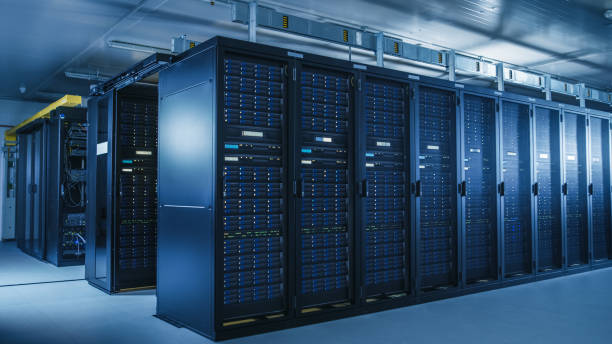
- Rack Servers: Designed to fit into standard server racks, these systems are commonly used in data centres and business IT environments.
- Tower Servers: These have a standalone design and are suitable for offices with smaller infrastructure requirements.
- Blade Servers: Compact server systems designed to operate within specialised enclosures, allowing multiple server units to share resources.
- Storage Servers: Built to manage large amounts of information and provide centralised data storage.
- Virtualisation Servers: Designed to support multiple virtual machines and computing environments on shared hardware.
Understanding these categories helps businesses identify equipment that suits their intended applications.
1. Evaluate Processor Performance and Requirements
The processor is one of the most important components of a server because it handles instructions, calculations and application workloads. Its capabilities directly influence how efficiently a server manages multiple operations.
When evaluating used server equipment, businesses should consider the processor generation, number of physical cores, clock speed and processing architecture.
Consider the Processing Workload
Different applications require different levels of processing power. For example, file-sharing systems may operate efficiently with moderate processing capabilities, while database management, virtualisation and application hosting may require more powerful processors.
Businesses should evaluate their expected workloads before choosing a configuration. This helps ensure that the selected hardware can support existing applications and accommodate future operational requirements.
Check Processor Compatibility
Processor compatibility is equally important. The processor must work with the server motherboard, chipset and supported memory configuration. Reviewing these specifications helps identify a suitable system for the intended computing environment.
2. Check RAM Capacity and Memory Configuration
Random Access Memory (RAM) temporarily stores information that the processor needs to access quickly. Server memory plays an important role in multitasking, application performance and managing simultaneous user requests.
A server with sufficient memory can support multiple applications and workloads more effectively.
Determine the Required Memory Capacity
The appropriate RAM capacity depends on how the server will be used. For example:
- File servers require memory suitable for managing storage operations and user requests.
- Database servers may need higher memory capacity for frequently accessed information.
- Virtualisation servers require sufficient RAM to allocate resources across multiple virtual machines.
- Application servers need memory that supports their software requirements and active workloads.
Review Memory Compatibility
Businesses should also check the supported RAM type, speed, capacity limits and available memory slots. Some servers support specific memory technologies, making compatibility an important part of the selection process.
Checking the installed memory configuration also helps determine whether additional RAM can be added later.
3. Examine Storage Capacity and Drive Options
Storage is another essential consideration when selecting server equipment. It determines how much information the system can hold and how efficiently data can be accessed.
Different server configurations support different storage technologies, including Hard Disk Drives (HDDs) and Solid State Drives (SSDs).
HDD and SSD Storage
HDDs use magnetic storage technology and are commonly selected for applications requiring larger storage capacities. SSDs use flash memory and generally provide faster data access and lower latency.
The choice depends on the workload, storage requirements and performance expectations.
Consider RAID Support
Redundant Array of Independent Disks (RAID) combines multiple drives to provide different storage and data protection arrangements.
Depending on the RAID level, configurations can improve read performance, provide redundancy or combine both capabilities. Businesses should check the available RAID controller, supported drive types and configuration options before selecting a server.
4. Verify Server Compatibility With Existing Infrastructure
A server must work effectively with the existing IT environment. Compatibility affects how easily the equipment can connect with network devices, storage systems, operating systems and business applications.
Check Network Connectivity
Review the available network interfaces and supported connection speeds. Businesses handling large volumes of data may require higher-speed network connectivity to support communication between servers, workstations and storage systems.
It is also useful to examine the number of network ports and expansion options.
Review Operating System Support
The selected server should support the operating system and applications required by the organisation. Businesses should verify hardware compatibility, driver availability and system requirements before finalising their selection.
This helps create a consistent computing environment and supports smoother deployment.
5. Inspect Physical Condition and Hardware Components
The physical condition of used server equipment provides useful information about its maintenance and previous operation. A detailed inspection helps businesses understand the condition of important components.
Examine Internal Components
Important components to inspect include:
- Motherboard and processor sockets.
- RAM modules and memory slots.
- Storage drives and drive bays.
- Cooling fans and heat sinks.
- Power supply units.
- Expansion cards and network adapters.
Each component should be checked for physical damage, proper installation and functional condition.
Check Cooling and Airflow
Servers generate heat during operation, particularly when handling demanding workloads. Cooling fans, ventilation openings and heat sinks help maintain suitable operating temperatures.
Businesses should check whether the cooling system is functioning correctly and whether the server design supports adequate airflow within the intended installation environment.
6. Understand Power Consumption and Energy Requirements
Power requirements are an important part of server selection because equipment operates for extended periods and may support continuous business activities.
Before choosing a used server, review its power supply capacity, supported voltage range and expected energy requirements.
Evaluate Power Supply Configuration
Some servers include single power supply units, while others support redundant power supplies. Redundant configurations can help maintain power availability if one supported unit experiences a failure.
Businesses should also verify whether the power supply units are compatible with the available electrical infrastructure.
Consider Operating Efficiency
Processor generation, workload intensity, cooling requirements and storage configuration can influence overall power consumption.
Evaluating these factors helps businesses select equipment that fits their operational environment and energy management requirements.
7. Review Expandability and Future Upgrade Options
Business technology requirements often change as organisations grow. A server that supports future upgrades can provide greater flexibility when additional computing resources are needed.
Check Available Expansion Slots
Expansion slots allow businesses to install compatible components such as network adapters, storage controllers and other hardware cards.
Reviewing the number and type of available slots helps determine whether the server can support additional functionality.
Evaluate Upgrade Potential
Businesses should check the maximum supported RAM, processor compatibility, storage expansion capacity and drive bay availability.
A flexible configuration can support changing workloads without requiring an immediate replacement of the entire server system.
8. Check Hardware Testing and Maintenance History
Understanding the testing and maintenance history of used server equipment helps businesses make informed purchasing decisions.
A properly evaluated server should undergo functional testing to confirm that its essential components operate as expected.
Important Testing Areas
The evaluation process should include:
- Processor functionality and performance.
- Memory testing and error detection.
- Storage drive health and operation.
- Network connectivity.
- Power supply functionality.
- Cooling system performance.
- Hardware monitoring and diagnostic checks.
Businesses should also review available maintenance records, component replacement details and hardware specifications.
This information provides a clearer understanding of the equipment’s condition and helps support the selection process.
9. Consider Warranty and Technical Support
Warranty coverage and technical support are useful considerations when selecting previously owned server equipment. Support arrangements can differ depending on the equipment’s condition, testing process and seller’s policies.
Businesses should understand the available warranty terms, coverage period and process for handling hardware-related issues.
Technical documentation is also valuable. Installation guides, hardware specifications and configuration details can help IT teams manage deployment, maintenance and troubleshooting activities.
10. Match the Server Configuration With Business Requirements
The most suitable server is not necessarily the one with the highest specifications. Instead, businesses should select equipment according to their actual computing requirements.
For example, a small organisation managing shared files may need a different configuration from a business operating databases, virtual machines or resource-intensive applications.
Create a Server Selection Checklist
Before making a final decision, consider the following points:
- Identify the primary purpose of the server.
- Determine processor and RAM requirements.
- Calculate the required storage capacity.
- Check hardware and software compatibility.
- Evaluate network connectivity.
- Inspect physical components.
- Review power and cooling requirements.
- Understand expansion and upgrade options.
- Check testing records and warranty coverage.
Following a structured checklist makes it easier to compare different server configurations and select suitable equipment.
Conclusion
Selecting previously owned server equipment requires careful consideration of performance, storage, memory, compatibility, physical condition and future upgrade options. Businesses planning to buy used server equipment should first identify their computing requirements and then evaluate each hardware component against those needs. A well-informed selection process helps organisations build suitable IT infrastructure, support everyday workloads and maintain flexibility as their technology requirements develop.